


The NTP server implements NTPv4 which is fully backwards compatible with NTPv3 and SNTP.
More details regarding the parameters and setup are included in the ⮫ application note.
For NTP server configuration add a new object “NTP Server” under one of the available “Ethernet interfaces (ETH1-ETHn)”.
Only one instance of the NTP server is possible at the same time.
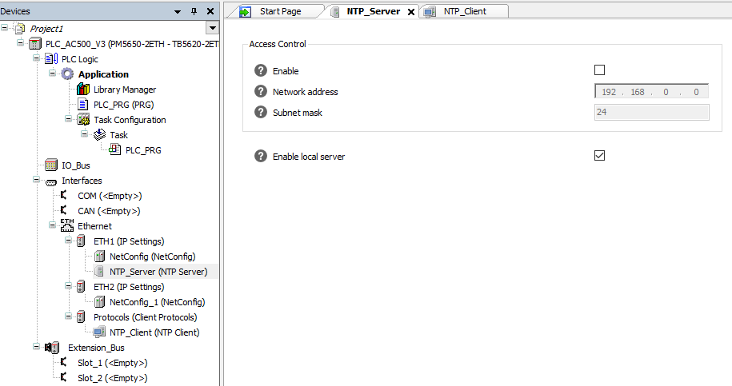
The following parameters are available:
Not all parameters are shown in the user interface by default.
It should not be necessary to change the default values of the hidden parameters for most applications.
It is possible to edit the default values in the generic device editor. To display the parameters, go to “Tools Options Device editor” and enable the option “Show generic device configuration view”.
Access control
|
Parameter |
Default |
Value |
Description |
|---|---|---|---|
|
Enable |
FALSE |
TRUE or FALSE |
Enables Access Control |
|
Network address |
0.0.0.0 |
Valid IP address |
Network address of allowed clients |
|
Subnet mask |
24 |
8 ... 32 |
Subnet mask of the network address |
By default, any request will be served with a reply. To restrict the requests to a specific subnet, the CIDR notation is used.
Example
Restrict access to the NTP server to the subnet from 192.168.0.1 to 192.168.0.254 by CIDR notation 192.168.0.0/24.
Local server
|
Parameter |
Default |
Value |
Description |
|---|---|---|---|
|
Enable |
FALSE |
TRUE or FALSE |
This option enables the protocol to run as local server. That means without synchronization to an external time source. |
|
Stratum |
10 |
1 ... 15 |
Stratum of the server when it is used as local server. |
|
Distance |
1 s |
0 … 3.403e+38 |
Root distances send by the server to the client in seconds when used as local server. |
|
Orphan |
FALSE |
TRUE or FALSE |
Enables or disables the orphan mode (Fall back to local time when primary time source is unavailable). |